Similar Posts
Google Groups with a building’s staff and students are now working
Bycollinsr
Each building has a Google Group that contains all of the staff and students in that building. They are now updated with the current staff and student members of the respective building: Kenton Elementary School – [email protected] Kenton High School – [email protected] Kenton Middle School – [email protected] I’m still trying to straighten out the permissions,…
Technology Survey for students and households
Bycollinsr
In the next few days the students of Kenton City Schools will be bringing home a technology survey. The survey consists of two pages, the first page is to be completed by each household once, while the second page is to be completed by the student (with assistance if need be). The data collected will…
Signing in to the Chromebooks and Google Classroom
Bycollinsr
This article is more for the elementary students that may be signing in to the Chromebooks for the very first time or are having issues signing in to the Chromebooks/ The KCS Chromebooks The Kenton City Schools’ Chromebooks are locked to KCS email accounts. Personal or other Google accounts cannot be used on the Chromebooks….
Storm technology update
Bycollinsr
The snow on Friday wasn’t an issue with the KCS tech, however, the thunderstorms and lightening on Sunday night were. Here is a recap of what happened: Fiber connection to WOCO went down. This connection was pretty much down starting around midnight until 6:45am Monday morning. Because of this, the Kenton City Schools website was…
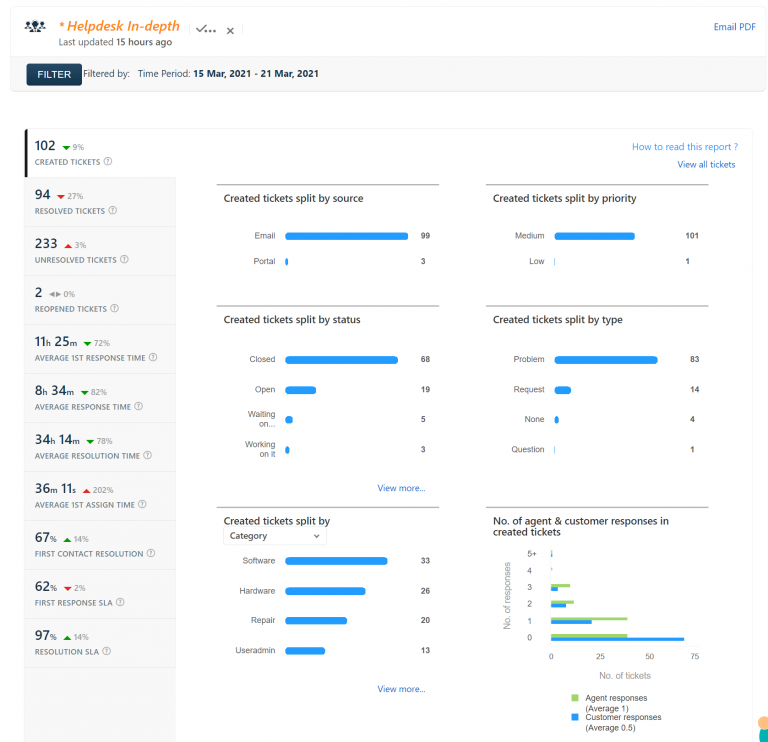
Technology report 11/12/15 – 11/18/15
Bycollinsr
Helpdesk Report