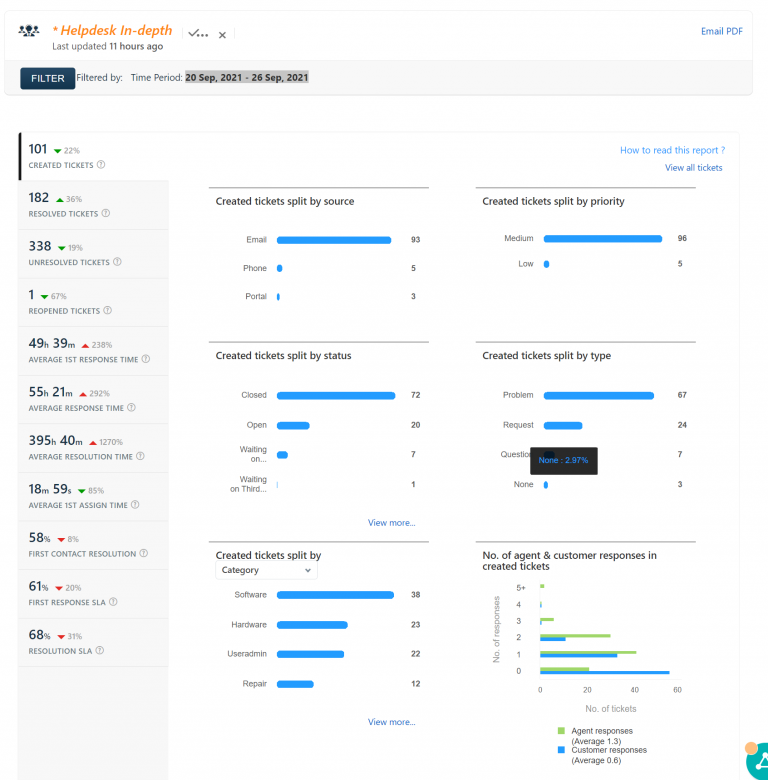
Help desk report 10/8/15 – 10/14/15


There are three big changes coming up for teachers of KCS. Once the new technology is in place, we’ll be scheduling PD classes on moving forward! I don’t have a timeline for the changes, it is dependent on when Apple will release the new computer models and how quickly they can be shipped. Hardware Desktop…
YTD Requests (2006/2007 – 2010/2011) 2006/2007: 2127 2007/2008: 2169 2008/2009: 2776 2009/2010: 3243 2010/2011: 3235 Tags used adobe, afp, ARRA, budget, cafeteria, camera, certificates, copier, dasl, display, dns, dvd, dvr, emac, email, fax, filemakerpro, filemanagement, filter, filtering, firefox, flash, fonts, google, googledocs, googleforms, harddrive, hp2420, hp4050, hp4100, ibook, ical, ie, iep, imacg3, imovie, installation, internet,…
Google has released updates for Google Classroom. The updates include “question-driven discussions including debates and question-and-answer sessions. Teachers can now post a question, video, article or other content in Classroom, and ask students to answer the question or write a response. Teachers also have the option of allowing students to comment on each other’s responses.”…
With the increased usage of Moodle, our web server has been taking a pretty good hit in the performance department. To alleviate the stress on the server, I’ve installed the Varnish caching software in front of the webserver.